

Want to know how to monetize your website with native ads? Or maybe you are an advertiser or affiliate marketer who wants to run profitable native advertising campaigns. Either way, this AdStyle review shows you how to do both.
AdStyle review TLDR
- AdStyle is an excellent choice for small businesses or affiliate marketers who want to increase online visibility, reach potential customers effectively, and drive lead generation or performance-based campaigns.
- It uses machine learning and data-crunching capabilities to deliver better customer ROI.
- It is a self-service, straightforward advertising network that helps you leverage native advertising as a publisher or advertiser.
- The entry barrier is low; you can start as an advertiser with $500. Publishers get paid as soon as they reach $50.
- Sign up for AdStyle and start leveraging native advertising.
What is AdStyle?
AdStyle is a native advertising platform that provides custom content to the right people at the right time. Using cutting-edge technology and a human touch, it delivers premium ad content based on audience preferences and improves the space for publishers, advertisers, and website visitors. Some of the world's biggest brands use this native advertising network, including EA Games, Variety, Toyota, Booking.com, and Dyson. AdStyle is becoming a leader in native advertising. Its mission is to make online ads more effective, efficient, and user-friendly. Its goal is to open native advertising to small businesses and advertisers who want to reach more people through content recommendations.

AdStyle Homepage Screenshot
AdStyle was founded in 2015 by a group of marketing professionals in Florida, United States. Its innovative technology helps advertisers reach their target audience more effectively and efficiently while giving users a better online experience.
One thing I like about AdStyle is that it offers features for affiliates and publishers in the same dashboard. That's handy for advertisers and affiliates running ad campaigns and monetizing their websites with native advertising. This way, you can easily use the balance, do advertising arbitrage, promote offers or your content, etc. After we discuss native advertising, we will start the AdStyle review, covering the functionalities for advertisers, then those for publishers, etc.
What is native advertising?
Native advertising is an online marketing method using paid ads that match the website's look and fit seamlessly into the surrounding content. It lets you target a highly relevant audience and display your content to people interested in your product or service. Their authenticity and non-intrusive nature let users enjoy quality native ads.
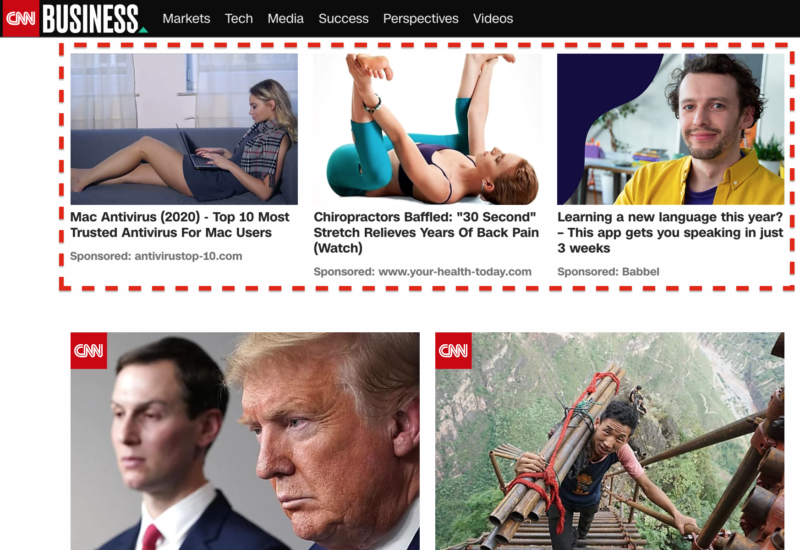
Native Ads Widget on the CNN website
In most cases, when we talk about native advertising, we mean content recommendations spread across websites, especially blogs and magazines. According to a Sharethrough survey, native ads drive more attention and brand lift than traditional display ads. Consumers looked at Native Ads 53% more frequently than display ads and 25% more consumers were measured to look at in-feed Native Ad placements than display ad units.
Unlike other types of advertising like display ads or popup ads, native ads integrate well with the website's content, not creating friction for the readers but also improving the conversion rate.
Further reading: Native Advertising Guide [Complete Version]
AdStyle Features for Publishers
As a publisher, you are looking for the best way to monetize the traffic that comes to your website. Fortunately, AdStyle provides a great way to do this using native advertising widgets. These native ad widgets give your readers a new experience they can engage with.
They will likely be excited about discovering more content since they are placed right after an article. So you'll not only gain additional revenue streams, but also provide your readers with an excellent service. Win-win! Now that you know what AdStyle can do for you, let's look into the features designed for publishers:
Publishers Requirements
AdStyle works with editorial publishers that create unique content and have an established readership base. Traffic requirements, however, can vary, and the platform doesn't follow a hard line on this. Each site is reviewed independently.
Ads should not take up more than 50% of the page above the fold when loading;
- Popup ads that cover the page upon loading are not permitted;
- A maximum of five AdStyle widgets are allowed per page;
- No automated clicking mechanisms (bots);
- Illegal and questionable content is not accepted;
- You can not encourage visitors to click your ads.
Check the complete set of widget implementation guidelines here.
Dashboard
If you meet the publisher requirements, which, let's face it, are pretty easy to assemble, let's look at the dashboard. To start using AdStyle, publishers need to sign up for the platform. Once signed in, publishers can access its dashboard. The dashboard provides detailed real-time reports about how views, clicks, CPCs, and CPRs are generated to show native ads on your websites. It is neat, simple, and easy to use. Nevertheless, the interface is self-explanatory and requires little help to figure out.
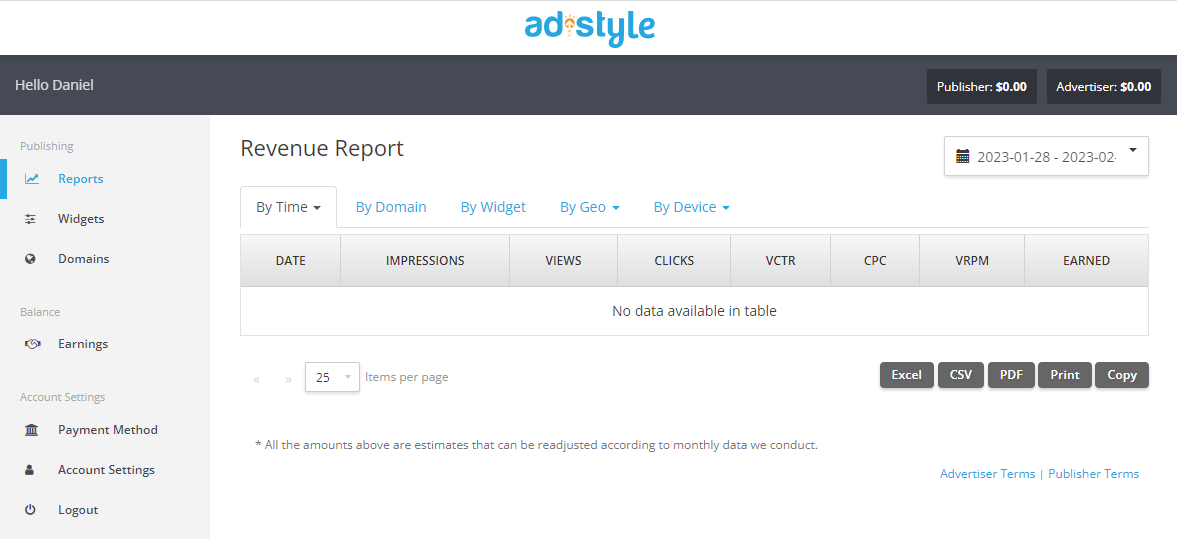
AdStyle Dashboard for Publishers
Here, you can view impressions, views, clicks, VCTR, CPC, VRPM, and revenue earned by published ads. You can also generate revenue reports based on date, domain, widget, GEO, and device. You can easily print and export all these reports to Excel, CSV, or PDF. They give you insights into which ads perform best and what content your audience engages with, so you can optimize accordingly.
Domains
Here, you can add your domains and view the ones already added, along with their status. First, add your website's domain. To do so, click on the Domains tab in the menu, then click on the Add Domain button. On the next page, add your website's domain name. Then, copy the Publisher Tag Manager code and place it within your website's head tag.
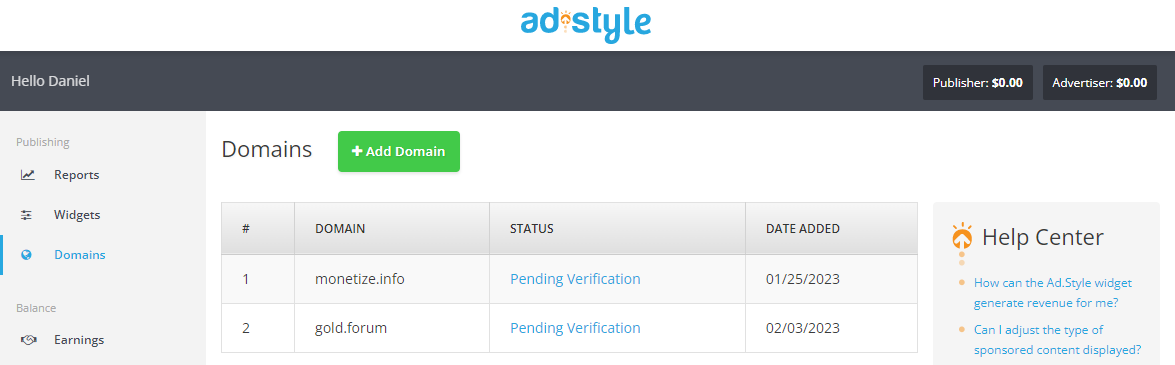
Verification will take approximately 48 hours. You can view the list of publisher websites you have on the Domains page.
Widgets
After you verify one or more domains, you can place ad widgets on your websites. These widgets show ads and make you money. On the widget summary page, you can see, edit, or customize all the widgets you added.
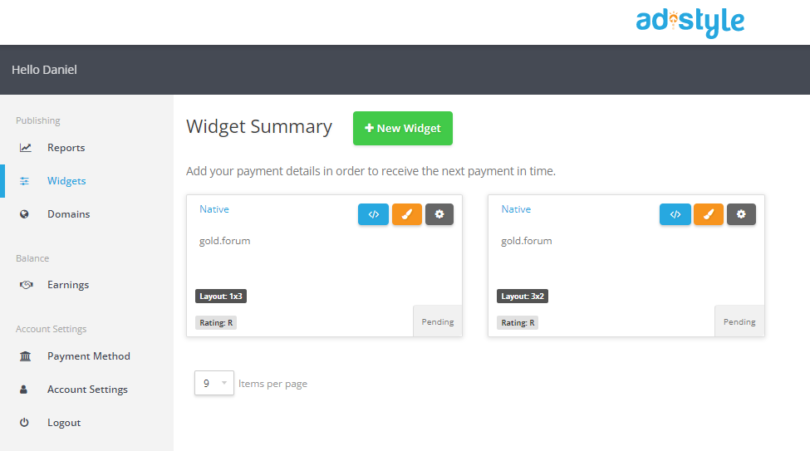
To create a new widget, head to the Widget tab and click on the Add Widget button. On the next page, complete a couple of details. You can choose either one of the domains you have already added or a new one on the spot. Note that you can't create a new widget without a verified domain.
Choose the language in which you want ads to be displayed. You can choose all languages, but it's best to select the one on which your website is. Next, choose the ad widget type you want to use. Your choices include Native, In-Content, Tabs, Banner, On-Scroll, and Discover. These will be the types of ads displayed on your website.
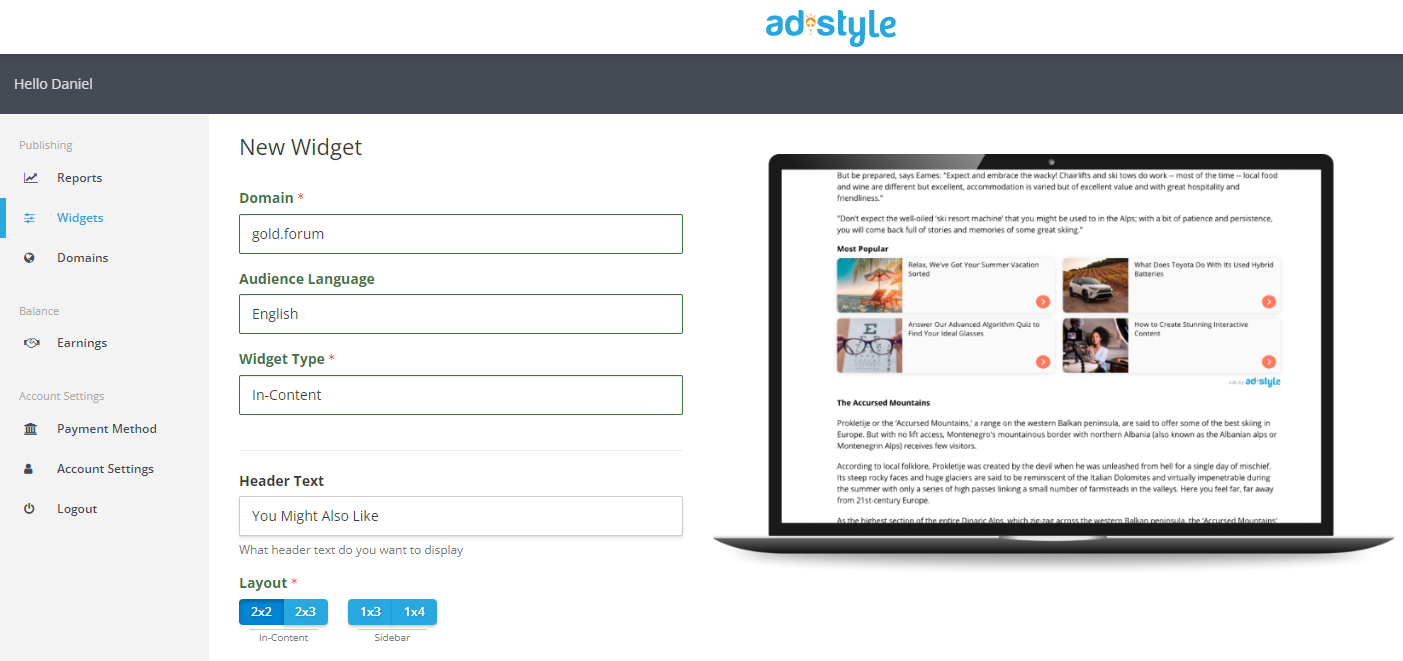
You will be asked for a Header Text and Layout (size) depending on your chosen widget type. Click Save when you have filled in all the details and are happy with the outcome.
Payment Details
One last step before making money as a publisher is to set up a payment method. You can request payment through Direct Deposit/ACH if you have a US bank account, Use Wire transfer for international transfers, or hold your payments until you reach the balance you want to withdraw.
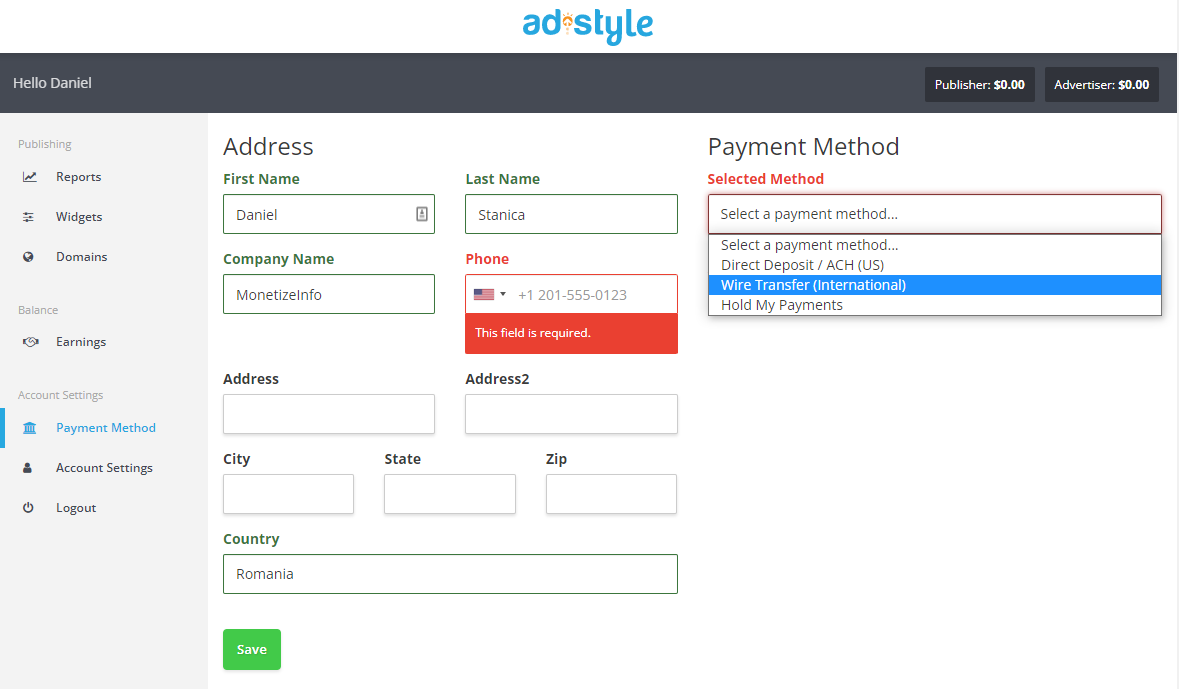
Remember that publishers are paid on a Net-30 basis, meaning you will receive your payment 30 days after the end of the month you generated the revenue. So, the revenue generated in January will be paid in March.
Earnings
You must maintain a minimum balance of $50, meaning you must earn at least this amount before the payment period ends to be allowed to withdraw your money. You can view how much you've made through the Earnings tab. Any amount that doesn't reach the minimum will carry over to the next month.
Tips to Maximize Your Earnings
Several factors can affect native ad performance, such as site location, user base, and how your widget is presented visually.
Following the guidelines below will help your widget perform best, whether your goal is earning revenue or increasing engagement.
- Keep styles compact and images large - AdStyle recommends using, or starting with, the 3×3 desktop/tablet layout when placed below the main content and 1 column on mobile.
- Don't limit ad content - You may notice certain content appears repeatedly or, in the case of sponsored content, that you don't think will appeal to your audience. The AdStyle widget learns what content your audience interacts with and shows the most successful content more often.
- Place your widget in a prominent location - The best place for the widget is usually directly beneath your page's main content. Keep the widget as high as possible on a home page or a site with a non-standard layout so users see it without scrolling too far.
- Make sure it looks good on mobile devices. Many of your users may be viewing your site on their phones. Images that span the whole width receive more clicks, so create separate mobile widgets for your site.
- Give it time - The widget may perform differently day to day for several reasons, especially on smaller sites. We recommend letting your widget run on your site for at least a week before evaluating its performance.
These guidelines result from extensive analysis and testing across many different sites, but please remember that every site and its users are other, so your results may vary.
AdStyle Review: PROs and CONs for Publishers
Now that you know what native advertising is, how AdStyle can help you advertise or bank on top of that, and what the main features of this advertising network are, let's look at both PROs and CONs of AdStyle side by side.
AdStyle PROs for Publishers
- Low payout threshold, making it small-publisher-friendly;
- No minimum traffic requirements;
- Easy-to-use and beginner-friendly publisher dashboard;
- Updated tech, including AMP page compatibility;
- You can use it alongside other ad networks.
AdStyle CONs for Publishers
- Adding Crypto as a payment method would be an excellent addition for finance publishers;
- Their knowledge base and help section answer only the basic questions.
AdStyle Features for Advertisers
Campaigns management
As an advertiser, campaign management is essential to your success. That's why you'll have a place to spend time reviewing and tweaking things.
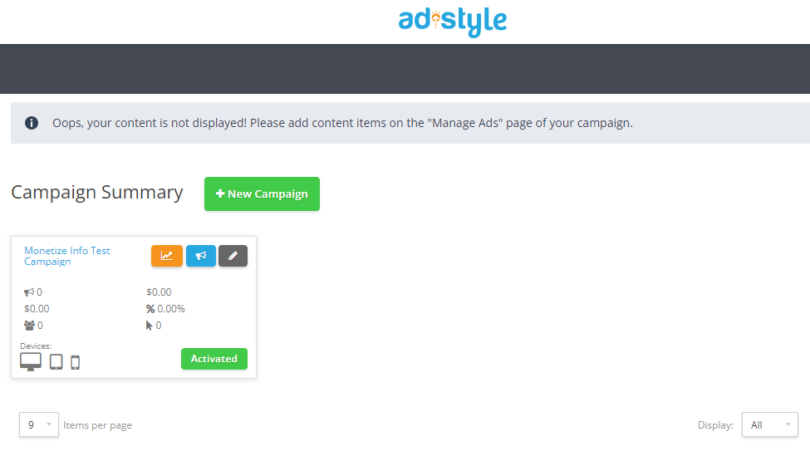
AdStyle Campaigns Management
AdStyle offers an easy-to-use management dashboard for your campaigns, where you can check performance, reports, settings, manage ads, and more.
Creating Your First Campaign
To create your first campaign, click the New Campaign button in the Campaign tab. Add your campaign name and choose your target audience's geolocation. You can select the country, region, or state. You can target as many locations as you like within a single campaign.
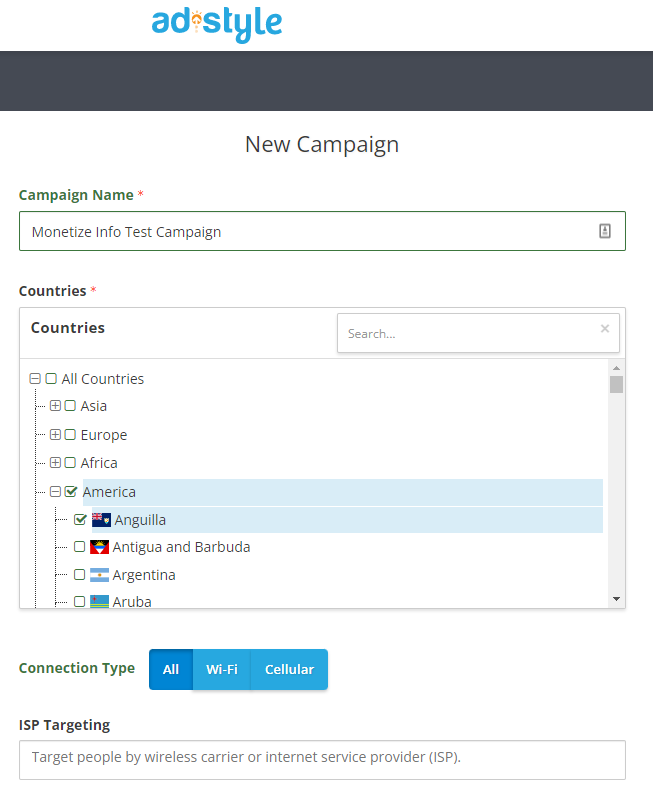
You also have the option to choose a connection type: WiFi, Mobile Data, or All types of connections. If you are targeting a specific telecom or ISP, type the name or search for it on the ISP targeting dropdown field. You can also retarget audiences who have already engaged with your other campaigns.
Just select the campaign from the dropdown menu. Place your bids on various devices in the next section. AdStyle uses a CPC business model, so your offer applies to every click you want to receive. The recommended CPC rates for various devices (desktop, tablet, and mobile) do not change, regardless of the geolocation, connection, ISP targeting, or retargeting options you previously selected.
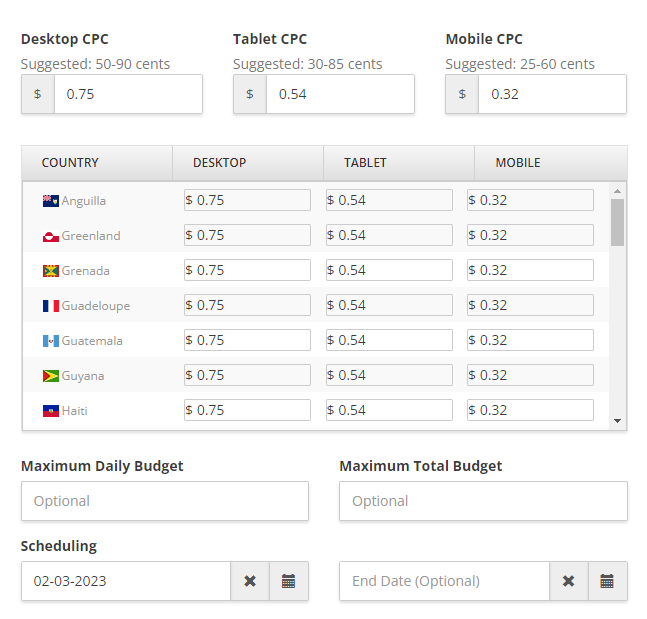
Tip: To target mobile users only, bid $0.00 on tablet and desktop, and vice versa. If you selected multiple locations, you can add a separate bid for each site and device by clicking the Advanced Bidding link. Next, click on the Show Optional Fields link. You can set your Maximum Daily Budget and Total Maximum Budget in this section. You can also add a start and end date for your campaign.
Use the Conversion Pixel
Below the scheduling option is the Conversion Pixel. Use this to help AdStyle automatically improve your campaign's performance based on conversions and other metrics.
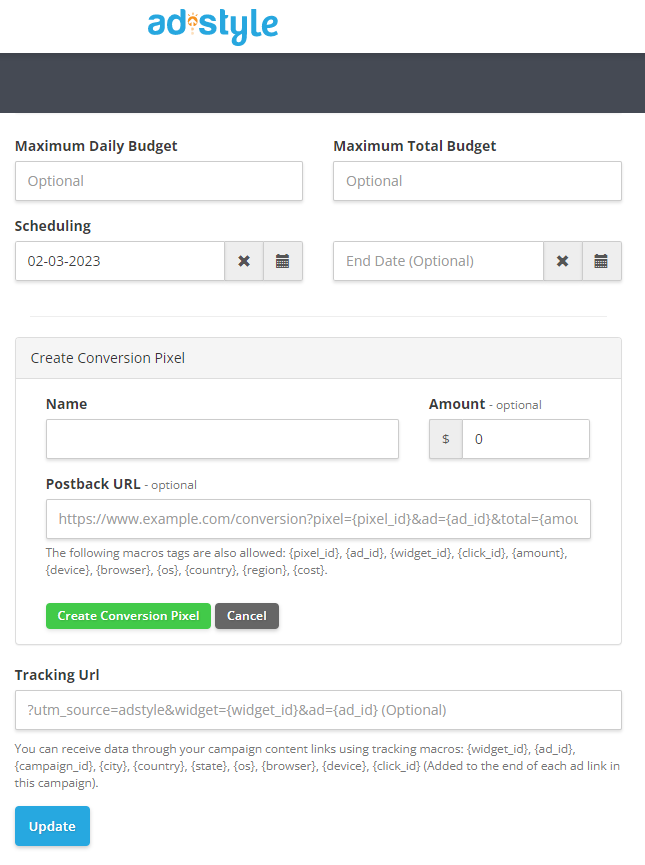
Creating a conversion pixel is also easy. Click the "Create Conversion Pixel" link, then add a name for the conversion, the conversion amount, and the Postback URL for either your tracker or your affiliate network. Verify everything, then click Save or Update when you're ready. Congratulations! You set up your first campaign on AdStyle. Now, let's create ads for your campaign.
Create ads
You can add up to 10 ad creatives per campaign. See the screenshot below for what the Create Ads form looks like.
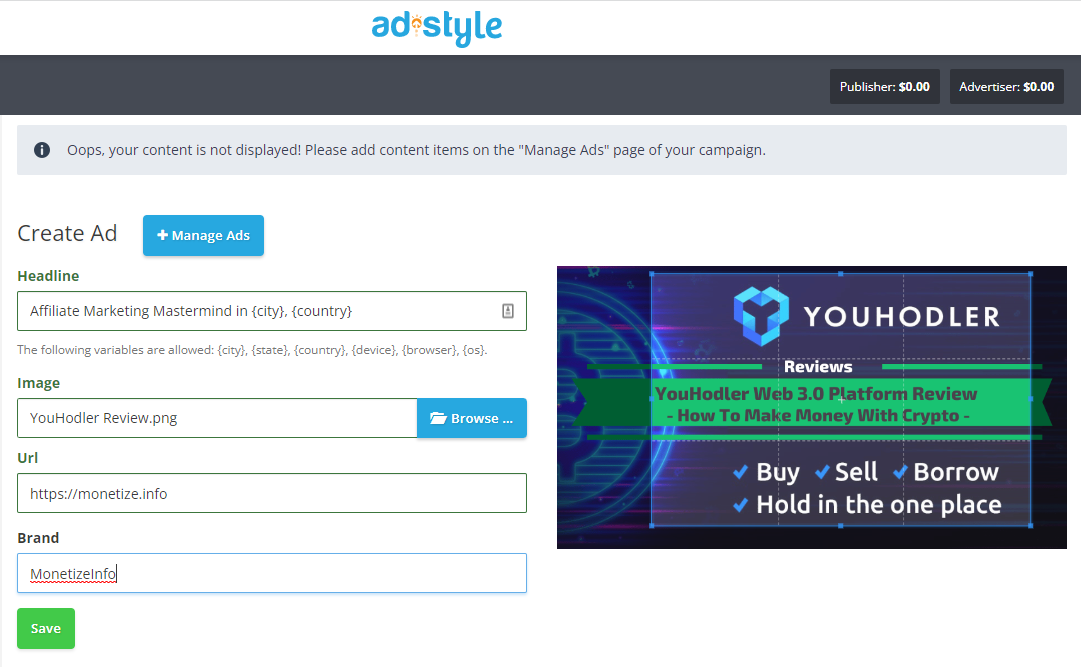
AdStyle - How to Create Ads
On the ad creation page, you will only be asked to fill out four fields:
- Headline – up to 65 characters and can include a dynamic variable (city, state, country, device, browser, OS)
- Image: It must be 16:9 or 4:3 and at least 600 pixels high and 1,000 pixels wide. If your image does not match the ratio, you can crop it upon uploading.
- URL—this is where you can add the first part of the link without the macros, which we discussed above. Based on our example, the URL will be https://oneclick.com/lp1.
- The brand is the name of the website or brand you want to display on the ad. It is optional.
Once you're done, click on Save. Your campaign will then be sent to the approval team for review. To submit your campaign for consideration, you must first fund your account. Approval takes one to three days. [divider style="dashed" top="10" bottom="10"]
Ads management
After you set up some ads, you can manage them in the Ads management section. Here, you'll find up-to-date information on ad views, clicks, conversions, CTR, etc.
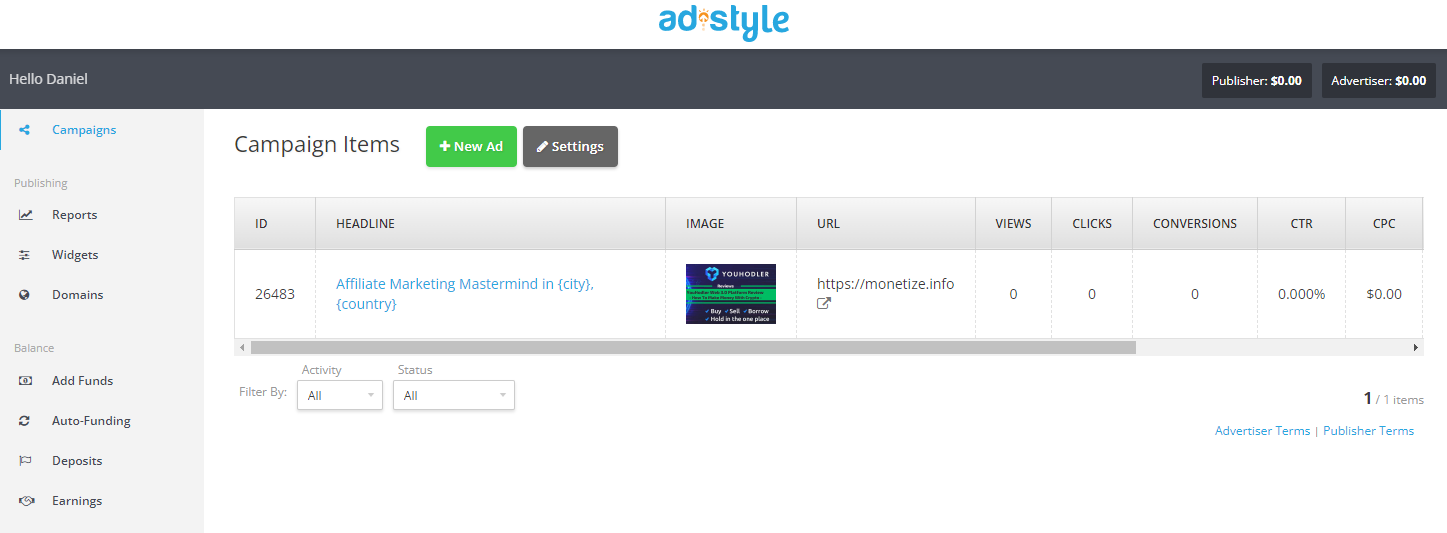
AdStyle - Ads Management
You can edit or pause ads from the Ads management dashboard based on their performance. [divider style="dashed" top="10" bottom="10"]
Reports
Review your performance regularly to get the most out of your AdStyle ad network campaign. By doing so, you can identify areas for improvement and areas for improvement. On the Reports tab, you can view your campaign analytics based on the following: Time – Date, Month, Day of Week, Day & Hour, or Hour of Day; Campaign and Ad; Widget; Geo – Country or Region; Device – Platform, OS, or Browser.
If you've set conversion tracking, you should be able to see the conversions, revenue, and ROI. Use this to evaluate your campaign's performance and optimize it by adjusting creatives, budgets, and publishers. [divider style="dashed" top="10" bottom="10"]
Funding
You can add funds through a credit card or PayPal. The minimum amount required is $500. A 3.9% processing fee applies to your deposit. Once your account has been funded, you can start running your ad campaign. Also, you can set auto-funding for your campaigns to avoid pausing your ads because of a lack of funds.
Tips to maximize your ad performance
Creating successful ad items is crucial for positive results at any marketing funnel - from consideration to lead generation and conversion. Match user expectations with the information on the landing page to increase interest and engagement.
Headlines:
- Be brief -- Content belongs on your page, not in your headline.
- Be informative -- Phrase your headlines as questions or "how to" statements.
- Be honest -- Misleading your readers about your content wastes your money and damages your brand's integrity.
Images:
- Use photos -- Photos of people or products are more engaging than graphics or diagrams;
- Customize them -- A small square in a widget may be clearer than an image splashed across your article.
- Make them big- Use large images in the best resolution to get people's attention.
AdStyle Review: PROs and CONs for Advertisers
Now that you know how AdStyle works for advertisers, let's look at the PROs and CONs side by side.
PROs of AdStyle for Advertisers
- It is a straightforward self-service network;
- It is easy to set up campaigns and ads;
- There is an AI algorithm that optimizes the ad display for you;
- The minimum deposit is only $500;
- You can place individual bids for multiple geographical locations and devices.
Cons of AdStyle for Advertisers
- Targeting is minimal; you'd have to rely on the algorithm to do the work.
- There are few publisher details (country, traffic, device, etc.).
AdStyle Support
You can get support in several ways if you encounter issues with AdStyle, want to implement it quickly on your website, or want to learn about new functionality. I recommend checking the Knowledgebase first. You can find answers to the most popular questions for publishers, advertisers, and readers there.
You should also check the AdStyle help center, where more questions are answered. If you can't find the answer, you can quickly contact a human representative by emailing [email protected]. You can also quickly fill out the contact form available on the website. You can even visit them in Florida, USA, as they publicly list their address: 2255 Glades Rd, Boca Raton, FL 33431, USA. I suggest you inform them first. You also have social media accounts. You can interact with AdStyle staff and other Twitter, Facebook, and LinkedIn users. There is also a blog with advice on optimizing your native advertising results.
There are plenty of help and support options. I think offering live chat and phone support would also help, but as far as I see, AdSyle was created as a one-stop shop and self-service native advertising network.
Conclusion on the AdStyle review
AdStyle is one of the best native advertising networks, providing value for publishers and advertisers. Once approved, publishers gain access to high-quality native ads, with only a tiny amount of time or effort needed to get up and running. Publishers also receive 24/7 technical support. Plus, the minimum payment threshold is only $50, so they can implement ads and get paid quickly. AdStyle's rigorous quality controls also ensure publishers can rest assured their content will be matched with brand-safe ads. I recommend publishers check out AdStyle if they want an alternative to their current ad network or their first native advertising platform.







Recommended Comments
There are no comments to display.